The register map, R0 to R104
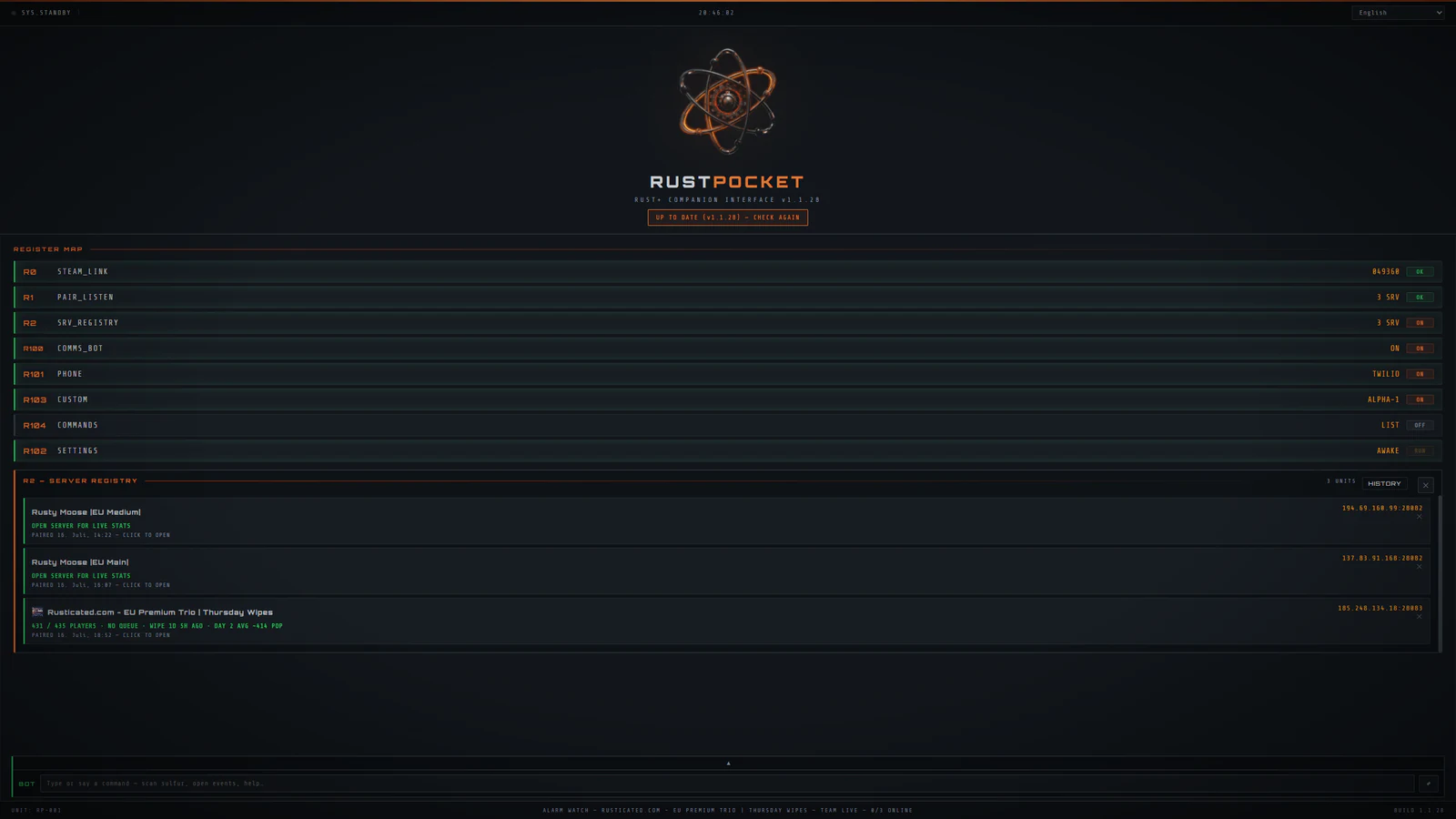
Each register is a module in the Windows app. This is the register map from the last released version, kept here while RustPocket is paused.
Every register
- R0STEAM_LINKConnect your Rust+ account once. It stays linked across wipes.OK
- R1PAIR_LISTENCatches in-game pairing for smart switches, alarms and storage monitors, at the moment you press Pair.OK
- R2SRV_REGISTRYSave every server you play, with live population, queue length, wipe age and the server's own logo on each. The average pop for this day of the wipe sits beside it, with its range and sample count, learned from your own history. Plus your Facepunch notification history, one click deep. Hop between wipes without setting anything up twice.OK
- R3EVENTSPatrol heli, cargo ship, chinook, oil rig hacks, the travelling vendor and the excavator, with a direction to look instead of a bare ping. Automatic respawn windows count down to the next cargo, heli or chinook and alert you the moment one can spawn again. An auto tracker learns when cargo, heli, chinook or an airdrop left this map and grades the wait as WAITING, WINDOW or OVERDUE, with timers you can edit per server, because modded servers ignore vanilla pacing. Ask !heli, !cargo, !chinook or !airdrop and the reply names the phase, the window and the grid.ON
- R4VEND_SCANSearch every shop on the map by item, price or currency, in one pass across the whole server, with the wear on used items shown per listing.ON
- R5WATCHWatch one shop, a dozen, or a material server-wide, and get told the moment stock or price moves.ON
- R6MONUMENT_CDPer-monument 30-minute card-room cooldown timers, persisted per server, started by voice or !cd.READY
- R7SMART_IOEvery paired switch, alarm and storage monitor in one panel, with bulk Defensive and Standby modes, switch automation that follows the in-game sun, a clock schedule you set, or who is online, auto turret re-arm, and a per-alarm push toggle.ON
- R8RECYCLERecycler yield calculator with safe-zone and monument multipliers. Know what a stack is worth before you burn it.READY
- R9BASE_IDEASBuild spots from real ore-node density and monument distance, including safer ground near Outpost and Bandit if you are new.READY
- R10RAID_MODERaid targets and the explosive math for C4, rockets and satchels by workbench tier, plus the offline raid warning.READY
- R11MAP_MARKERSTeam pins and notes, synced through Rust+ chat so everyone sees them.READY
- R12CCTV_CODESWatch your own cameras live from the desktop while you are logged off. Pan and zoom PTZ cameras, aim and fire auto turrets, and get told when a player walks into view. Plus every monument camera code for the Computer Station.READY
- R13MONUMENTSThe raid and PvP monuments on the current map, safe zones excluded, underwater labs called out.READY
- R14CHATSRead and send in-game team and clan chat from your desk, mirrored live, with clan info, the full member list sorted by rank with online status, your role and permissions, and MOTD editing when your rank allows it.READY
- R15TIMERSPersonal countdown timers by team chat command: !settimer, !timer, !cleartimer.READY
- R16SHOP_STATSTrack income and best sellers on your own vending machines: revenue by currency, per shop, over the wipe.READY
- R17INTELEnemy online/offline patterns, raid-window prediction, a watchlist with alerts, and Steam hours behind each name. Killers join the list on their own: die to a player and they are filed with a kill note, their real Steam ID resolved from your own Rust client log within seconds.READY
- R18GENETICSPlant genetics for the farm: draw a box over the gene readout once and scan genes straight off the screen. G, Y, H, W and X are read by glyph shape and colour, with a preview of exactly what was captured. Scans save as clones, a crossbreed helper predicts offspring, and the clone library stays per server. Pasting a gene string works as the fallback.READY
- R19CLANYour clan, read-only: members with ranks and online status, open invites and the message of the day, live over the official Rust+ clan API and refreshed on a five-minute clock. Steam IDs resolve to names through your team roster. Nothing in it can kick, promote or edit, by design: an overlay should never touch clan management.READY
- R100COMMS_BOTAnswers by voice, by typing, in team chat and in your Discord server: pop, time, events, cargo, scan, and 30-plus more, with German aliases next to the English commands. Event replies name the grid. Tracks deaths and speaks replies.ON
- R101PHONERaids, deaths, alarms, events, monument timers, nightfall, vending restocks. Free via Telegram, or SMS and voice via Twilio. Alarms and teammate logins arrive by Facepunch push even while the server link is down.ON
- R102SETTINGSKeep the PC awake, auto-reconnect, raid-warning sensitivity, Steam Web API key, updates, plus the app language. Ten of them: English, German, French, Italian, Spanish, Portuguese, Russian, Polish, Turkish and Dutch, switched from the top bar or Settings and applied without a restart. After an update, a popup in your theme and your language shows what changed, once.READY
- R103CUSTOMThemes, UI scale, panel layout, which modules show on screen, and the event respawn timers for servers that override them. Make the desk yours.READY
- R104COMMANDSThe full command catalog: every command the bot answers, in-game, in Discord, in the app console and by voice, with what each one does. German aliases answer next to the English commands.READY
Why registers, not features
The app addresses its modules by code (R0, R3, R101) the way it does internally, rather than by a marketing name that changes with the season. A register is a fixed address you can point an alert or a command at, and it is how you can tell this is a real tool with real parts rather than a landing page with six icons.